
Cardbox 3.0 and Novell
Cardbox for Windows 3.0 allows shared access to databases by each user's copy of Cardbox communicating with a single program, the Cardbox Server, which performs searches and supplies data as necessary. The Cardbox Server is the only program that actually opens the Cardbox database files themselves: in fact, in a strictly organised system, the database files themselves should not be visible to individual Cardbox users at all.
This client-server architecture is different from the way in which things were organised in previous versions of Cardbox, where everyone had simultaneous shared access to the database files and there was no separate Cardbox Server program.
The Cardbox Server can be run on any computer on the network, as long as the Cardbox Server can access and open the Cardbox database files. Often, people meet this condition by running the Cardbox Server on the file server itself, but there is no rule that says that this has to be the case: it is just that many people find it convenient to set things up this way. (There are other obvious requirements – such as the computer needing to be switched on whenever anyone wants to use a shared Cardbox database – that are automatically fulfilled if you run the Cardbox Server on the file server).
There are versions of the Cardbox Server for Windows and for Linux. This means that if you are running a network that has a Novell file server, you cannot run the Cardbox Server on the file server. The rest of this document explains the ways you can organise Cardbox on such a network.
Taking over a workstation
Any computer running Windows can run the Cardbox Server. So you can simply run the Cardbox Server on one of your workstations. The Cardbox databases themselves can remain on the file server, so nothing needs to change as far as data security and backup are concerned. If the workstation fails to start up one day, no data will be lost and you can simply run the Cardbox Server somewhere else. The only thing that you have to remember is that the Cardbox Server has to be running in order to allow anyone at all to use the shared databases, so you should select your workstation accordingly.
If you set up the Cardbox Server to run as a Windows "system service", it will run as soon as the workstation has been switched on, even if no-one logs in to it. You have to adjust a few setup parameters to allow a system service to access files across the network: these are described below.
The Cardbox Box
A rational alternative is to install an additional computer solely to run the Cardbox Server. The computer does not have to have much in the way of disk space, since the databases are all stored on the file server, and it does not have to have a particularly high performance in most cases, since the Cardbox Server is quite efficient. Given the low price of commodity hardware nowadays, a dedicated computer running Windows or Linux can be quite cost-effective.
Networking and Windows system services
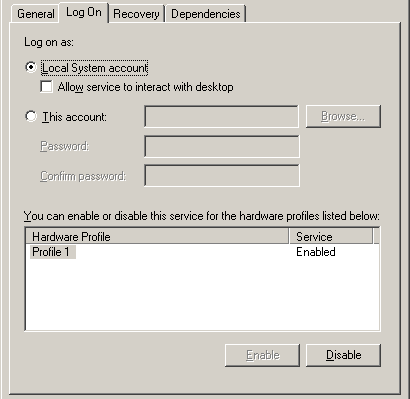 Every
Windows program runs under a user account of some kind – even a single-user
Windows installation is effectively operating with a user name such as "Owner"
or "Administrator". By default, Windows system services run under
a special account called "Local System", which is allowed to do
almost anything on its own computer but has no ability to access network resources.
If you want your Cardbox Server to open files across the network, you will
have to change this default setting.
Every
Windows program runs under a user account of some kind – even a single-user
Windows installation is effectively operating with a user name such as "Owner"
or "Administrator". By default, Windows system services run under
a special account called "Local System", which is allowed to do
almost anything on its own computer but has no ability to access network resources.
If you want your Cardbox Server to open files across the network, you will
have to change this default setting.
- Open the Control Panel.
- In "Administrative Tools", select "Services".
- Double-click on "Cardbox Server", then go to the "Log On" tab.
- Select "This account", and enter the user name and password of an account that is allowed to use the network.
A note on filenames
If you are used to referring to network files with names such as R:\databases\contact.fil (in other words, by using drive letters such as R:) then you should be aware that Windows internally converts those drive letters to network resource names and that this conversion may be different for different users... which can be rather confusing. So when you are setting up your Cardbox Server, don't use drive letters for the filenames: instead, use the full "UNC" form of the name: something like \\server\cbdata\databases\contact.fil. If you're not sure what the correct resource name for a given drive letter is, right-clicking on the drive in Windows Explorer should tell you.